Online rota for the whole team
The manager builds the rota on a laptop or phone, the team sees it in the app the same minute. Swaps, time off, shift-based pay and API access in one system.
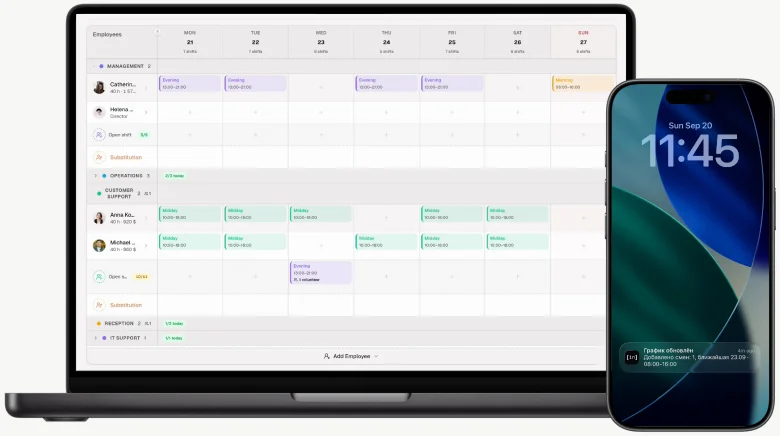
- Admin panel in the browser
- Support chat
Three workplaces, one system
Admin panel, team app and terminal
The manager builds the rota on a laptop, the team sees it on their phones the same minute, and a tablet by the door clocks people in. One set of data, no exports or reconciliation.
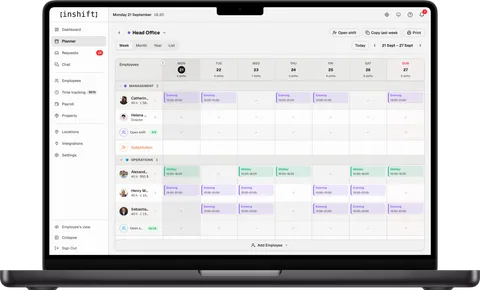
Admin panel
Rota and payroll on a laptop
The manager’s workplace in the browser: a week, month and year planner, team requests, shift-based payroll, time tracking and Poster POS.
- Only you see the draft, the team gets the rota once published
- Time off, swaps and open shifts in one list with “Approve”
- Payroll sheet built from shifts, Excel export
- Time tracking board: who is on site right now
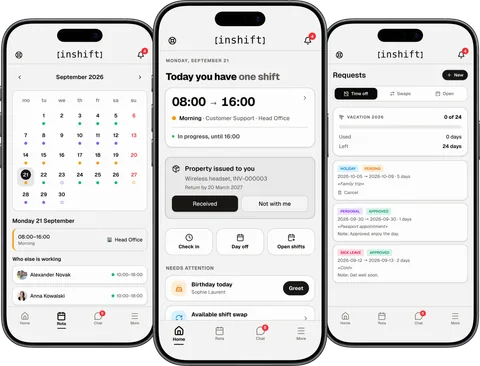
Team app
Everyone’s rota on their phone
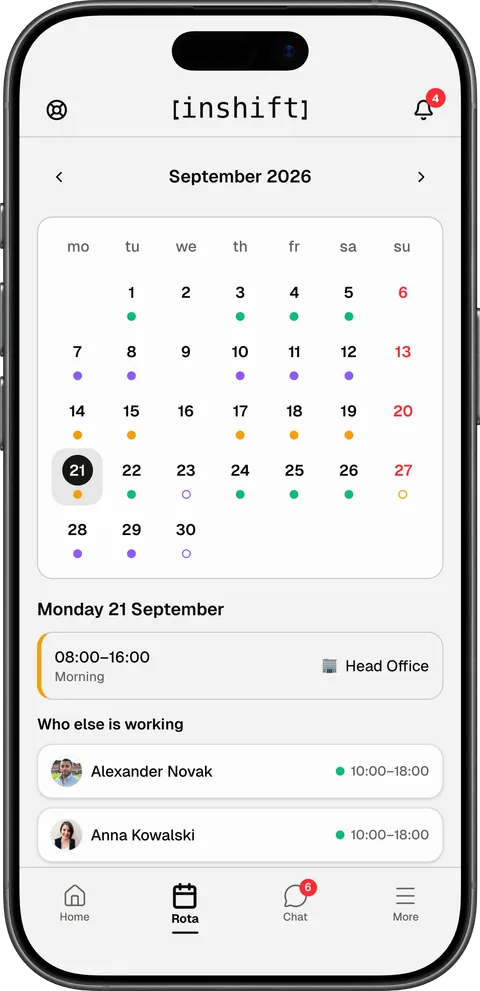
An app for iPhone and Android: their shifts as soon as the rota is published, a swap with a colleague in two taps, a time-off request, camera clock-in and team chat.
- A push the moment the rota changes and a reminder an hour before a shift
- Swaps and open shifts without calling the manager
- Time-off requests from the phone, the decision comes as a push too
- Managers get their team dashboard in the same app
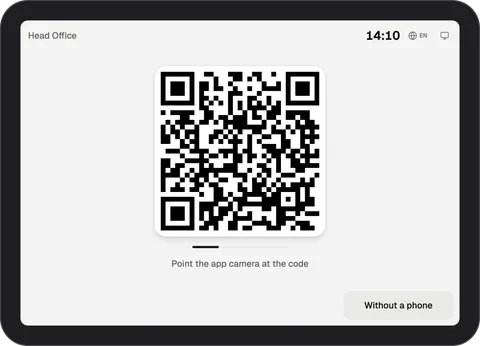
Tablet terminal
Time tracking, no hardware
Any tablet by the door becomes a terminal: the team clocks in, out and on break with the app or a PIN, and the manager sees who is on site on the board.
- Clock in within a second: camera on the code or a staff number and PIN
- No clocking in from home: the code only works on site
- Board: on site, on break, no show
- Clocked hours next to payroll
Team onboarding
Connect your team in 2 minutes
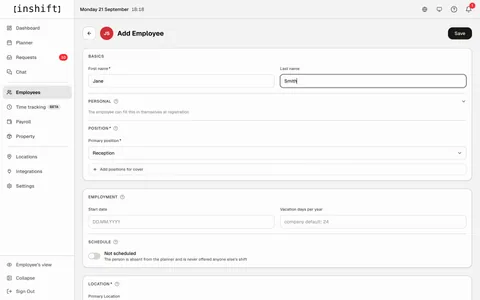
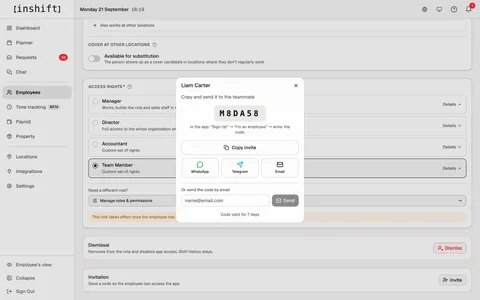
The manager adds a person in the panel and gives them a code, the person enters it in the app and sees their rota right away.
Product features
Everything you need to run a rota
Rota, swaps, pay from shifts, time tracking, chat and team equipment in one system. The manager works from a laptop or a phone, the team sees everything in the app.
Rota planning
A week, a month or a year in the browser or on a phone.A week, a month or a year in the browser or on a phone. Shift types with their own days and times, copying last week, clashes flagged as you go. Drafts are yours alone, the team gets the rota once you publish it.
Swaps, open shifts, time off
An employee asks for a swap, a colleague agrees, the manager approves in one click.An employee asks for a swap, a colleague agrees, the manager approves in one click. People apply for an open shift from their phones, and the manager picks. Holiday, sick leave and personal days are requested from the phone.
Pay from shifts
Hourly, per shift, a monthly salary or a price on a specific shift.Hourly, per shift, a monthly salary or a price on a specific shift. Night and holiday multipliers, allowances, a share of sales through the Poster POS, payouts and the balance owed to each person. Everyone sees their own pay in the app.
Time tracking
Clock in and out from the phone, or a PIN on the terminal for people without one.Clock in and out from the phone, or a PIN on the terminal for people without one. A live board: who is in, who is late, who has left. Worked hours sit next to planned hours in the timesheet.
Manage from a phone
The planner, request approvals, inviting people and the day's summary in the app.The planner, request approvals, inviting people and the day's summary in the app. The rota gets fixed on the move, a laptop is optional.
Chat and announcements
A general chat, a chat per location and groups in the app.A general chat, a chat per location and groups in the app. An announcement from the manager reaches the whole team, and you can see who has read it. Rota, swaps and messages in one app.
Equipment tracking
Uniforms, keys, tools, devices: what was issued to whom and who has it now.Uniforms, keys, tools, devices: what was issued to whom and who has it now. The person confirms receipt in the app, returns and handovers stay in the history.
Locations, departments and roles
Several sites from one panel, each with its own shift types and pay rules.Several sites from one panel, each with its own shift types and pay rules. Roles for the manager, the director and the employee, or your own: who sees the rota, who edits it, who sees pay and at which locations.
Notifications and quiet hours
Push about rota changes, requests and approvals on iOS and Android.Push about rota changes, requests and approvals on iOS and Android. Quiet hours at night are set by the person. Shifts can be added to a Google, Apple or Outlook calendar.
Integrations
Connects to what you already run
The POS, the calendar and your own systems. The data arrives on its own, nothing is copied by hand.
POS
Connect your POS and every cashier’s sales arrive on their own, with a percentage of them in pay. Poster connects today; Square, Lightspeed, Loyverse, SumUp, Zettle and Shopify POS on request.
Which POSExcel and PDF
The pay sheet with “Export to Excel”, the rota for any period from the planner’s “Print” menu. For the books without an API, and for the wall.
Calendar
Each person subscribes to their rota in Google Calendar, Apple Calendar or Outlook. Shifts update on their own.
API and webhooks
API keys and webhooks for your own integrations, MCP for Claude and ChatGPT. The rota, people and events into your systems.
API documentationAll integrationsAll integrations: POS, the books, API, Claude
AI integrations
Run your schedule through AI: Claude or ChatGPT
Ask who works tomorrow, add a shift in plain words, pull a timesheet for the month. InShift connects to Claude, ChatGPT, Claude Code, Cursor and Codex as an MCP server.
- Who is on tomorrow, who is free, who is on leave: answers straight from the schedule
- Add, move or remove a shift in one sentence. The assistant checks the schedule first: who is free, which location
- Timesheets, clock-ins and pay for a period, right in the chat
- Exactly the rights of the API key: read only or with edits. Revoke the key and access is gone
- Every shift made from the chat is signed in the history with the key and client name
- Claude Code
- Codex
- Cursor
- Gemini CLI
Who works tomorrow at Head Office?
Loaded tools, used InShift integration
Working tomorrow (2026-09-21) at Head Office:
10:00–18:00: Alexander Novak, Liam Carter, Anna Kowalski, Michael Peters, Thomas Bergmann
13:00–21:00: Catherine Moreau, Helena Walsh, Henry Montgomery
Who at Head Office is free tomorrow? Put one of them on 13:00 to 21:00 and publish.
listEmployees
Free at Head Office tomorrow: Sebastian Graham and Sophie Laurent (the other 8 are already scheduled).
I'll put Sebastian Graham on the 13:00–21:00 shift (his position matches the existing "Evening" slot) and publish it now.
createShift
Done. Sebastian Graham is now published for 13:00–21:00 at Head Office tomorrow (2026-09-21), he'll see it on his schedule immediately.
Roles and access
One app, three roles
The owner runs the group, the manager plans the rota, staff see their own shifts. Everyone sees exactly what they need for the job.
Control every site from one interface
Run several locations: coffee shops, shops, restaurants, hotels, warehouses. Reports on hours and labour cost, flexible roles for managers and accountants.
- Departments and job titles
- Rates and reports
- Roles and access rights
Plan shifts from a phone or a laptop
Build a weekly or monthly rota, approve holiday requests and swaps, add new staff in a minute. Works on any device.
- Weekly and monthly rota
- One-click approvals
- Invite by code
Your own rota in your pocket
Check your shifts, arrange swaps with colleagues, send holiday or sick leave requests in a few taps. Push notifications when the rota changes.
- My rota by week and month
- Swaps with colleagues
- Push notifications
Pricing
Free for up to 10 people, then $1.99 per person
Unlimited locations on Basic, the team app included.
Free
$0
1 location, up to 10 people, rota for this week and next
- Rota, shift types and open shifts
- Team app with push notifications
- Swaps, time off and sick leave as requests
- Payroll: rates, premiums, payments
Basic
$1.99per person a month
Billed in packs of 5 people: from $9.95
- Rota with no time limit, unlimited locations
- Time tracking and equipment as modules, POS on request
- Percentage of till sales
- API, webhooks and AI assistants, support operator in chat
The first 30 days after sign-up run on Basic in full.
Which businesses it suits
Rotas for any trade
From a small coffee shop to a hotel group. InShift fits anywhere that runs shifts.
Coffee shops
Restaurants and bars
Retail shops
Hotels and hostels
Beauty salons
Medical centres
Warehouses and logistics
Delivery services
Security
Try it without an account
Three tools that need no sign-up and no email. Build a rota or add up hours right now, and move to an account when the team has to see it.
Common questions about rotas
Frequently asked questions
Cannot find an answer? Get in touch.
How much does InShift cost?
Free for one location and up to 10 people, payroll included. Basic is $1.99 per active person a month with unlimited locations and API keys, 20% less when paid yearly. People are billed in packs of 5. AI assistants come with Basic at no extra charge, time tracking and equipment tracking are turned on as separate modules and are free for now, and POS integration is connected on request. Prices in US dollars, excluding VAT.
Why is InShift better than Excel or Google Sheets?
Excel does not spot shift conflicts, does not send notifications and does not work out pay for you. InShift has it all in one place: rota planning, swaps between colleagues, holiday requests, push notifications, pay calculation and Excel export.
What kind of business is InShift for?
Any business that runs shifts: coffee shops and restaurants, retail shops, hotels and hostels, beauty salons, medical centres, warehouses, delivery services, security. From a team of 3 to a group of 500+ staff.
How do I build a rota in InShift?
Create a location, add job titles and staff. Then assign shifts from templates or by hand in the weekly or monthly view. The system spots conflicts and overlaps, and flags shifts nobody is covering.
How does InShift work out hours and pay?
Set an hourly rate for each staff member. InShift adds up the hours worked over the period you choose, multiplies them by that person’s rate, and exports the timesheet to Excel. Rates are per person, so what someone earns follows them across sites.
Is there a mobile app?
Yes. The team installs InShift from the App Store or Google Play. They see their rota, their requests and their swaps, and they get a push notification the moment anything changes. The admin panel is built for a desktop but works from a phone too.
How many locations and staff can I add?
On Basic there is no limit: run a single coffee shop or a group of dozens of sites, each with its own departments, job titles and shift types, and the price follows the number of people alone. Free covers one location and up to 10 people.
How do I invite staff to the team?
In the admin panel, create an invite code for them. They install the InShift app from the App Store or Google Play, sign up with their email and enter the code, and their rota is there. You collect no emails and create no accounts by hand, and nobody waits for an approval.
Can I track working time and holiday?
Yes. Holiday, sick leave and personal day requests are submitted from the phone. The manager approves or declines in one click. Hours worked go into the timesheet automatically.
How do swaps between staff work?
A staff member posts a swap request in the app, colleagues see the available shifts and accept the offer. The manager gets a push notification and confirms the cover in one click. No group chats, no phone calls.
Which languages and regions are supported?
Ukrainian, English and Russian. Switch between them in settings. InShift works from any region, and time zones are set for each location separately.
Where is my data stored and is it protected?
Data is stored on InShift servers in the EU, with daily backups. Access is limited to you and the staff you grant rights to. We do not pass information to third parties.
Can I set up night shifts and 24-hour duty?
Yes. In the shift type set the start and end (22:00 to 06:00, for example); the night hours are counted by the “Night hours” premium in “Payroll”. A 24-hour duty goes on the rota as two 12-hour shifts, so hours and pay are counted per shift. Handy for security, hotels and medical centres.
Can I print the timesheet or send it to my accountant?
Yes. The timesheet exports to Excel for any period: a week, a month, a quarter. The file opens in any spreadsheet, ready to hand to your accountant.
What are open shifts and why would I need them?
The manager publishes a shift with nobody assigned to it. The team sees it in the app and taps “I want it”, and the manager picks who gets it. It saves the day when someone is off sick or a location needs cover urgently. No calls, no back and forth in chat.
Add your first staff member in a minute
Sign up in a minute, build the first rota tonight. The team sees it in the app the same day.