The board shows the plan and the fact side by side: who was due in by the schedule, who clocked in and when, who is on a break, who has already left. It passes no verdicts: “scheduled from 09:00, clocked in at 09:07”, and whether that is “late” is for the manager to decide. The board lives by day, and any day can be opened retroactively.
Marks that did not happen or were made wrong are entered and corrected by the manager by hand right on the board. Forgotten clock-outs are closed by the system itself a few hours after the shift ends.
The board is seen by the owner, co-owners and anyone whose role has the “Manage time tracking” permission, for their own locations or the entire network.
Where to find it
“Time tracking” → the “Board” tab. At the top “2 on site · 6 listed”, search, the date with the “Today” button and the “Location” filter. If there are several positions, the “Position” filter is next to it.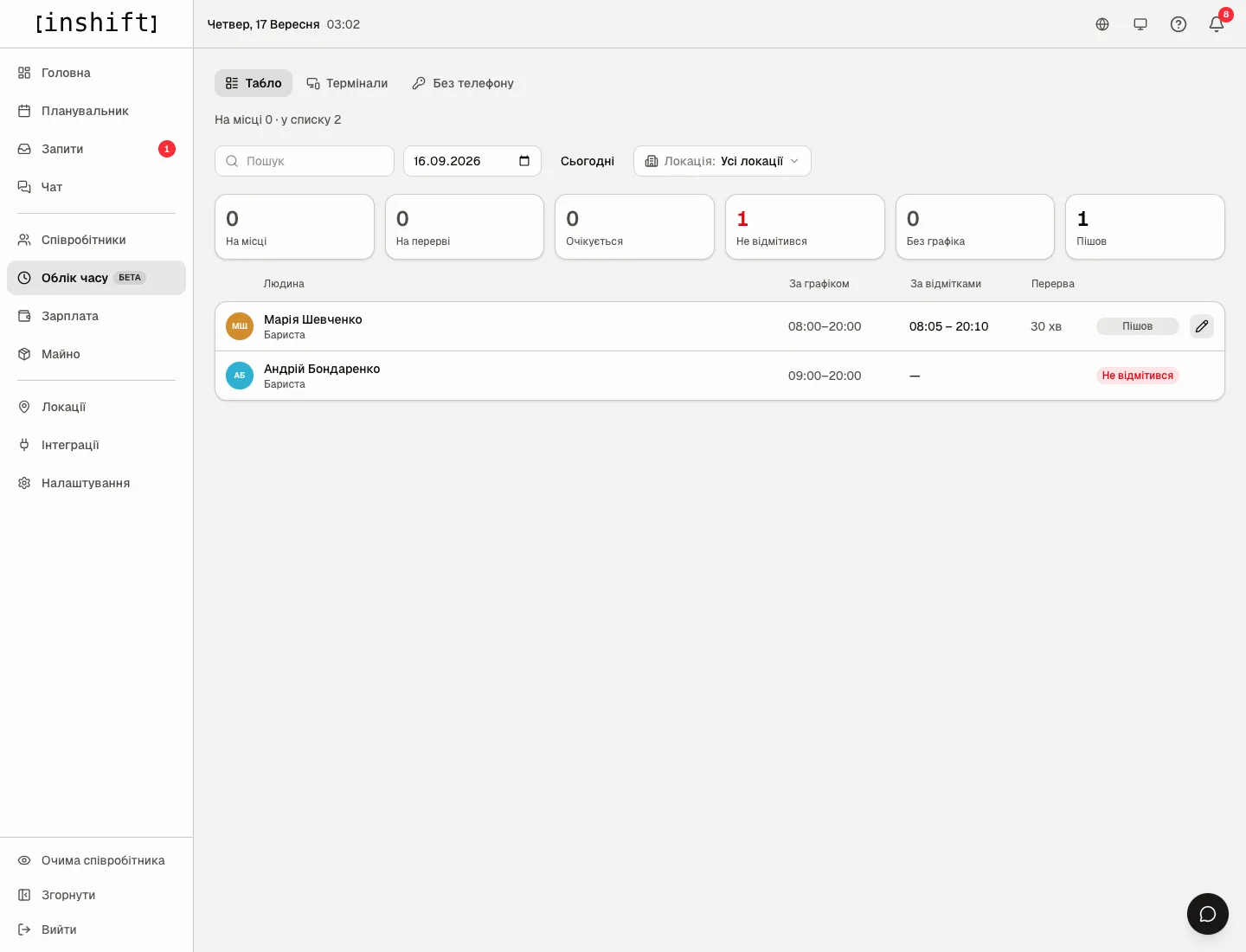
What the states mean
Six tiles above the list count people by state, clicking a tile narrows the list to it.
“On site”: the person has a shift in the schedule for this day and has clocked in.
“On break”: clocked a break and has not come back yet.
“Left”: clocked out, the shift is closed.
“Expected”: there is a shift in the schedule, no marks yet, and the shift time has not passed yet.
“No check-in”: the shift in the schedule has ended, and there were no marks at all.
“Off schedule”: the person clocked in but has no shift in the schedule for this day, for example they were called in for the evening. Such rows are at the end of the list with “no schedule” in the “Scheduled” column.
The list reads like a timetable, by shift start time, not by alarm: otherwise at noon the whole evening shift would push out those who are on site right now.
How to read a row
“Person”: name and position. “Scheduled”: the shift time from the planner. “Checked in”: the arrival and departure time by marks, for example “08:05 – 20:10”, or only the arrival if the shift is still running. “Break”: how many minutes the person was on a break. The state is on the right.
The row of a person who has clocked in has the “Correct the shift” pencil. A row with no marks has the “Add a shift manually” button.
An empty day: “No shifts and no check-ins for this day” with the hint “Check-ins will show up here as soon as someone clocks in on a terminal or in their app”.
Step by step: enter or correct a mark
- In the person’s row click “Add a shift manually” or the “Correct the shift” pencil. The window “Shift for Maria Shevchenko. Local time, same as in the table.” opens.
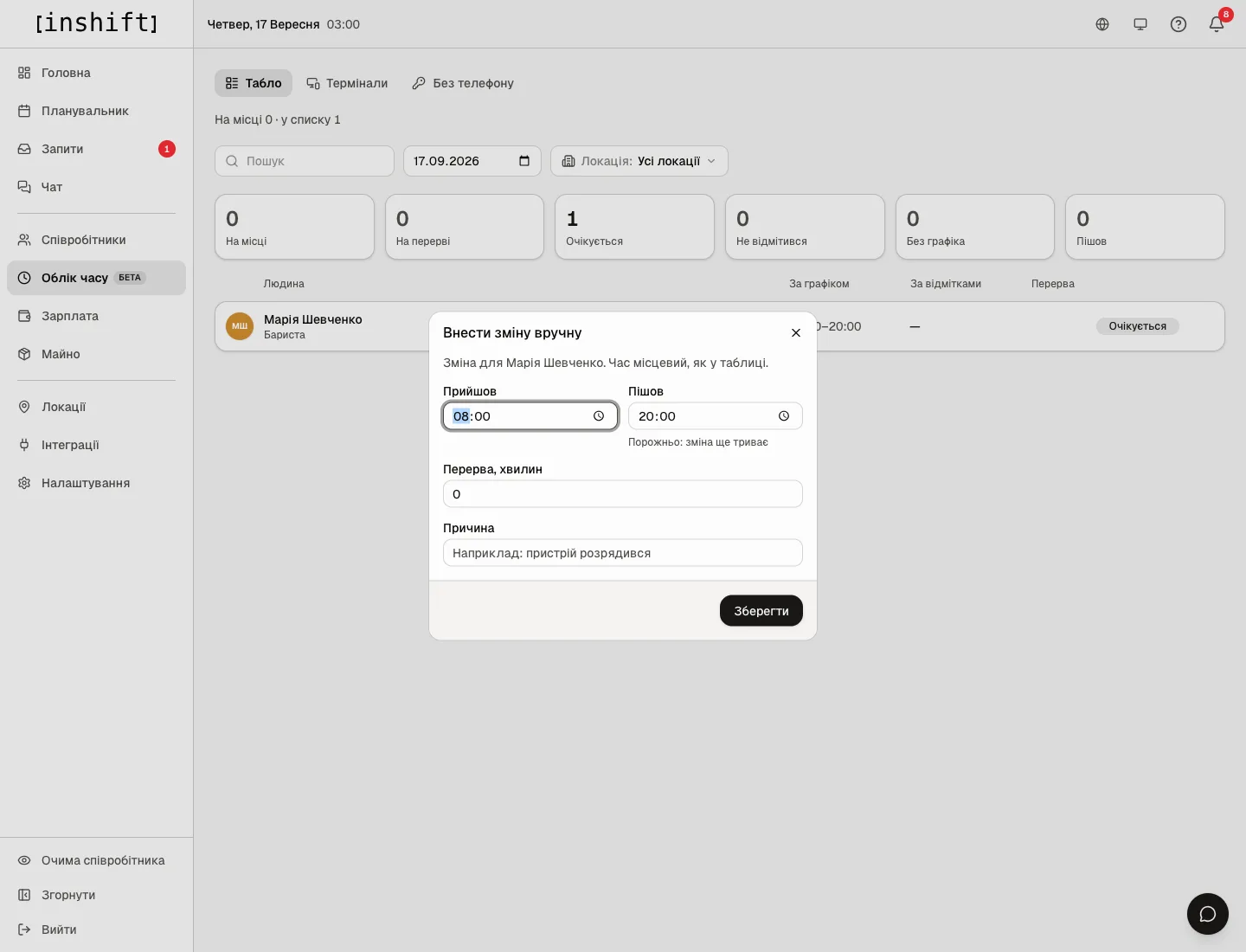
The “Add a shift manually” window: the fields “Clocked in”, “Clocked out”, “Break, minutes”, “Reason” - Fill in “Clocked in” and “Clocked out”. An empty “Clocked out” means “the shift is still running”, as the hint says: “Leave empty if the shift is still running”. The panel suggests the shift time from the schedule.
- If needed, “Break, minutes” and “Reason”, for example “the device ran out of battery”. The reason stays in the record so it is clear later why the mark was entered by hand.
- Click “Save”. A shift entered or corrected by hand shows on the board like the rest, and in the “Payroll” section its hours go into the “Checked in” column.
Remove a wrong mark: the “Remove shift” button in the correction window.
The arrival time cannot be in the future: the panel says “A shift cannot start in the future”. It cannot be saved without an arrival time: “Enter the start time”.
Forgotten clock-outs
If a person did not clock out, the shift stays open, and on the board they are “On site”. The system closes such shifts itself: four hours after the shift’s scheduled end, which for evening shifts is at night, and for an off-schedule shift sixteen hours after the arrival. The check runs every hour. The closing time is the scheduled end of the shift, if there is none, the last mark, and if there is none either, the moment of arrival, that is a zero-length shift: better an empty shift the manager notices and corrects than invented hours.
The same person’s next clock-in also closes a forgotten shift by the same rules.
Check yesterday’s board in the morning: automatically closed shifts are worth correcting by hand if the person really did stay late.
Why an action is unavailable
There is no “Board” tab: the module is off, see Enable time tracking and set up a terminal.
A person is not on the board: they have neither a shift nor marks for this day, or they are at a location other than the one chosen in the filter. “Nobody matches this filter”: remove the filter or change the search.
An empty slot in the schedule, a shift with nobody assigned, does not get onto the board: there is nobody to clock in.
There is no pencil in a row: the person has no marks for this day yet, “Add a shift manually” is there instead of the pencil.
The time cannot be saved: the arrival is in the future or empty.
Saving your own mark says “Your own attendance is corrected by a manager above you or the owner. Ask them to fix it”: nobody corrects their own marks except the owner. Someone else’s marks are corrected by whoever manages the person: a person of their own locations whose role has fewer rights.
Questions and answers
Does the person see that the manager corrected their mark?
In the app under “My check-ins” they see the time that is in the record. The reason for the correction is seen only in the panel.
Can someone clock in from another location?
The terminal is tied to a location, and the mark is recorded there. In the “Location” filter such a row appears under the terminal’s location.
How do I look at last week?
Pick a date in the field next to the search. The “Today” button returns to the current day.
Does the board affect payroll?
No, money is counted by the schedule. Hours by marks are shown in “Payroll” in a separate column for comparison, see Worked hours for a period.
Can I correct my own mark?
No, unless you are the owner. Your own marks are corrected by a manager above you or the owner: ask them.