An announcement is a message from the manager to the whole team or to the people of particular locations. It lands in the app chat with the “Announcement” mark and arrives as a push, and the panel shows how many people have read it. It is one way to tell everyone at once and be sure it got through: not a conversation but a broadcast.
An announcement lives in two places at once: in the “Announcements” feed in the panel and as an ordinary message in the channel where the team reads it: the general chat or the location chats. Editing and deleting the original reaches there too.
Announcements can be published by the owner, co-owners and anyone whose role has the “Publish announcements” permission: for their own locations or the entire network.
Where to find it
“Chat” → the “Announcements” channel at the top of the list with the hint “The team sees announcements in the app chat and gets a push”. At the bottom the “Announcement text…” field, above it “Audience” and the counter “will get: 4 · no app: 2”.
In the team’s app: the “Chat” tab → “Announcements”, and also in the general chat or a location chat.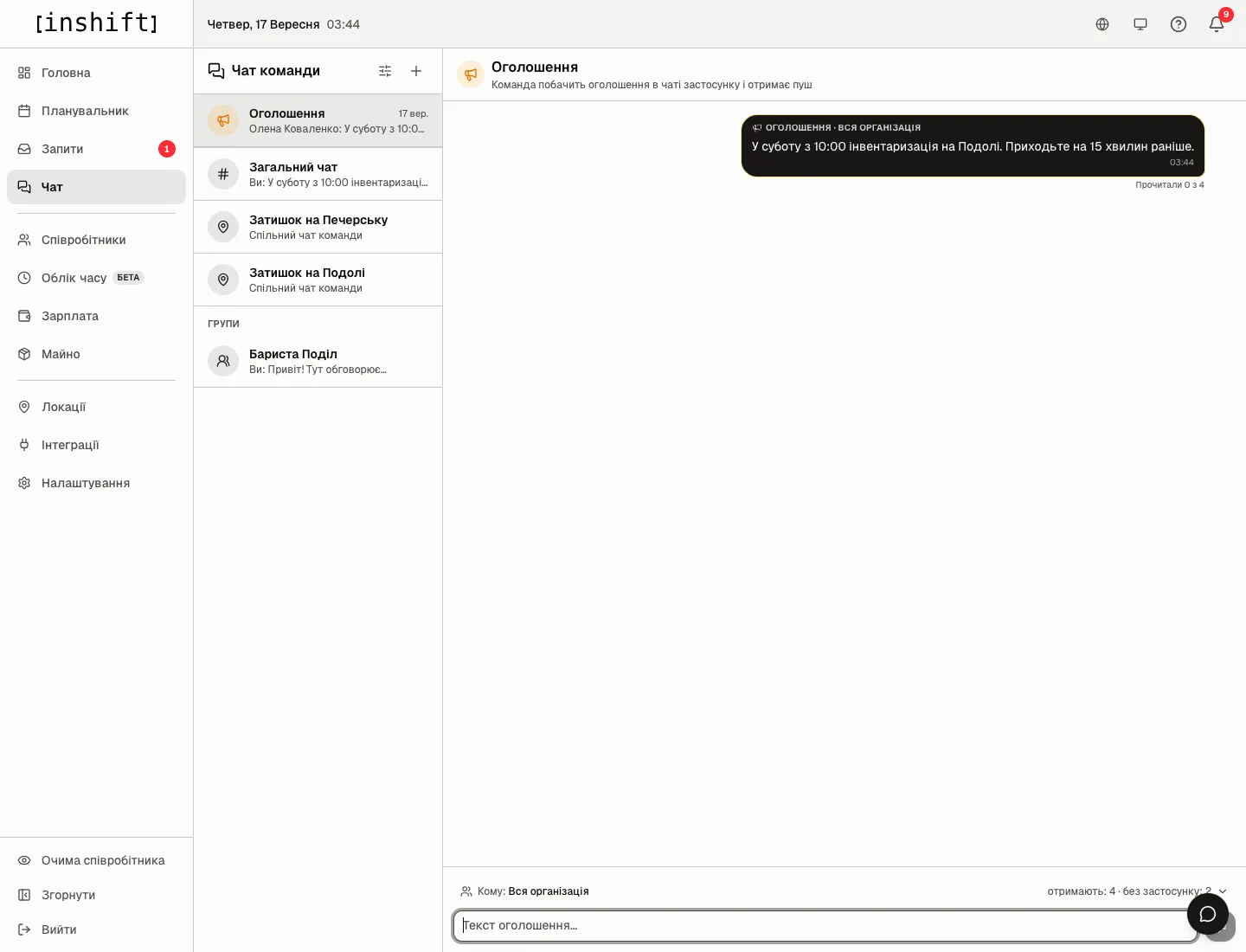
Step by step: publish
- Open “Chat” → “Announcements”.
- Click “Audience” and choose “Whole organisation” or one or several locations. The counter on the right immediately shows “will get: 4 · no app: 2”: how many people will get the push and how many of those chosen have not connected the app yet, that is, will see nothing. The number is counted by the server across the whole audience, not just those you see in the team list.
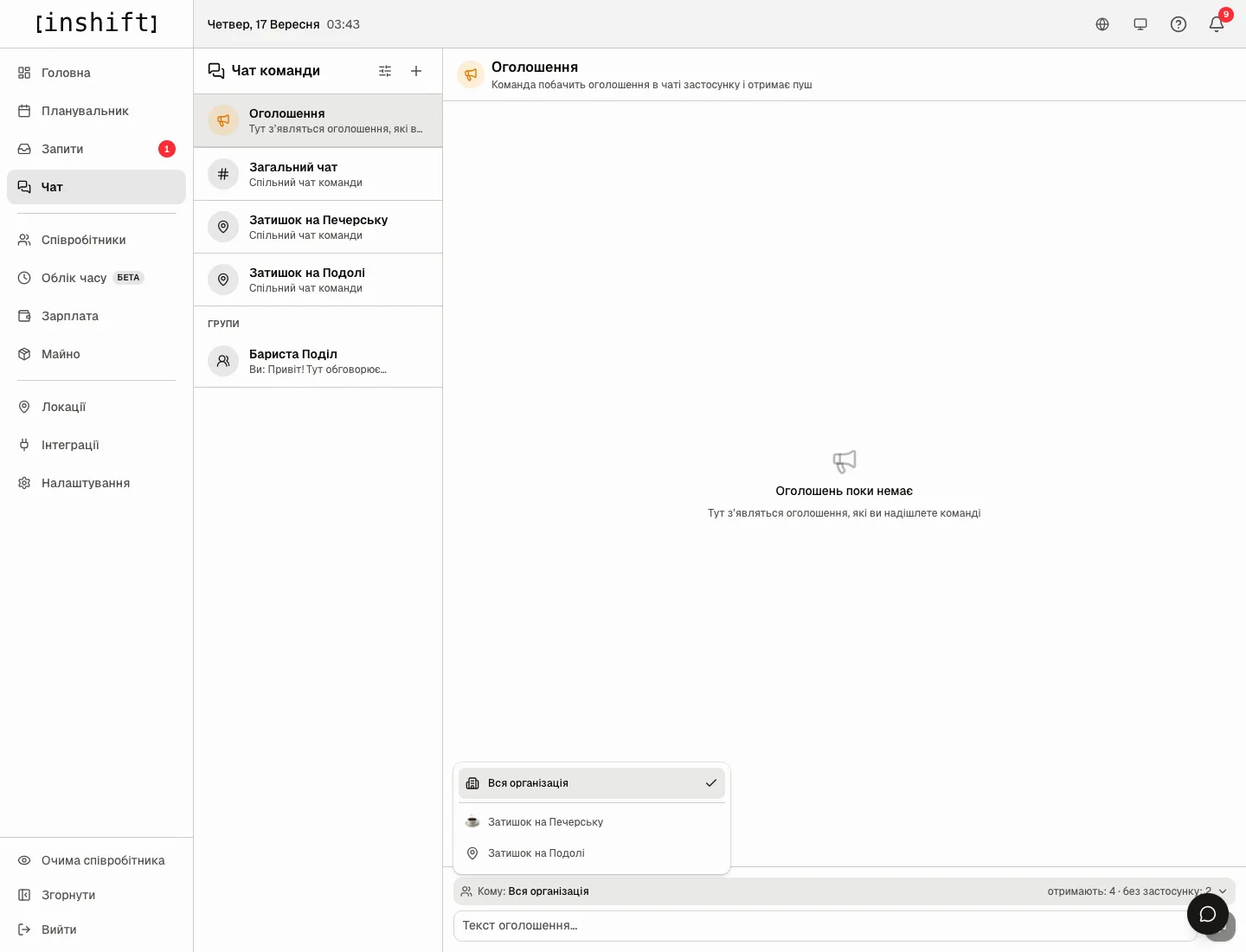
Choosing the “Audience”: “Whole organisation”, “Cosy Corner on Pechersk”, “Cosy Corner on Podil” - Type the text into “Announcement text…”. Enter makes a new line.
- Click the “Publish” button to the right of the field. The announcement appears in the feed with the mark “Announcement · Whole organisation” or the location names and the caption “Read by 0 of 4”. The team gets a push, and a copy with the “Announcement” mark appears in the general chat or the chats of the chosen locations.
- Click “Read by N of M” to see “Who has read”. People from other locations you cannot see are shown as the line “3 more people from other locations”.
Editing and deleting
Hover over an announcement in the feed: “Edit” opens the text for editing, and the saved text is updated in the chat copies too, with the “edited” mark.
“Delete” asks “Delete this announcement?” and explains: “The announcement disappears from the feed; in the chat a "message deleted" note stays in its place.” That way the team will not read a mistaken broadcast, and “Message deleted” stands in its place.
Why an action is unavailable
There is no “Announcements” channel: your role does not have the “Publish announcements” permission.
A location is missing under “Audience”: your announcement permission is limited to your own locations.
“no app: 2” is more than zero: some people have not connected the app and will not get the announcement. Invite them, see The invite code: how it works and what to do when it fails.
The “Publish” button is inactive: the text is empty or nobody is chosen, “Choose who receives it”.
A person says the push did not arrive: check the notifications on their phone, see Notifications are not arriving. The announcement itself stays in the chat regardless of the push.
Questions and answers
How does an announcement differ from a message in the general chat?
An announcement arrives as a push to everyone chosen, sits in a separate feed with a read counter and a mark, and stays in the chat as a copy. A message in the chat is just a message.
Can people reply to an announcement?
Yes, in the chat where the copy landed: reply to it as to an ordinary message. The “Announcements” feed has no replies.
Can an announcement be sent to one person?
No, the smallest audience is a location. Write to one person in the chat.