Request rules define what the team can do on its own from the app: swap shifts, take open shifts, submit holiday and sick leave requests. For each kind you choose a mode: off altogether, requires the manager's approval, or everything happens automatically.
The rules apply to the whole organisation. Which managers approve the requests, though, is set not here but in the roles: the “Approve substitutions” and “Approve time-off” rights in each role separately, article Roles and access.
Only the owner and co-owners can change the rules.
Where to find it
“Requests” → the “Settings” button at the top right → the “Request rules” page. Only the owner and co-owners have the button.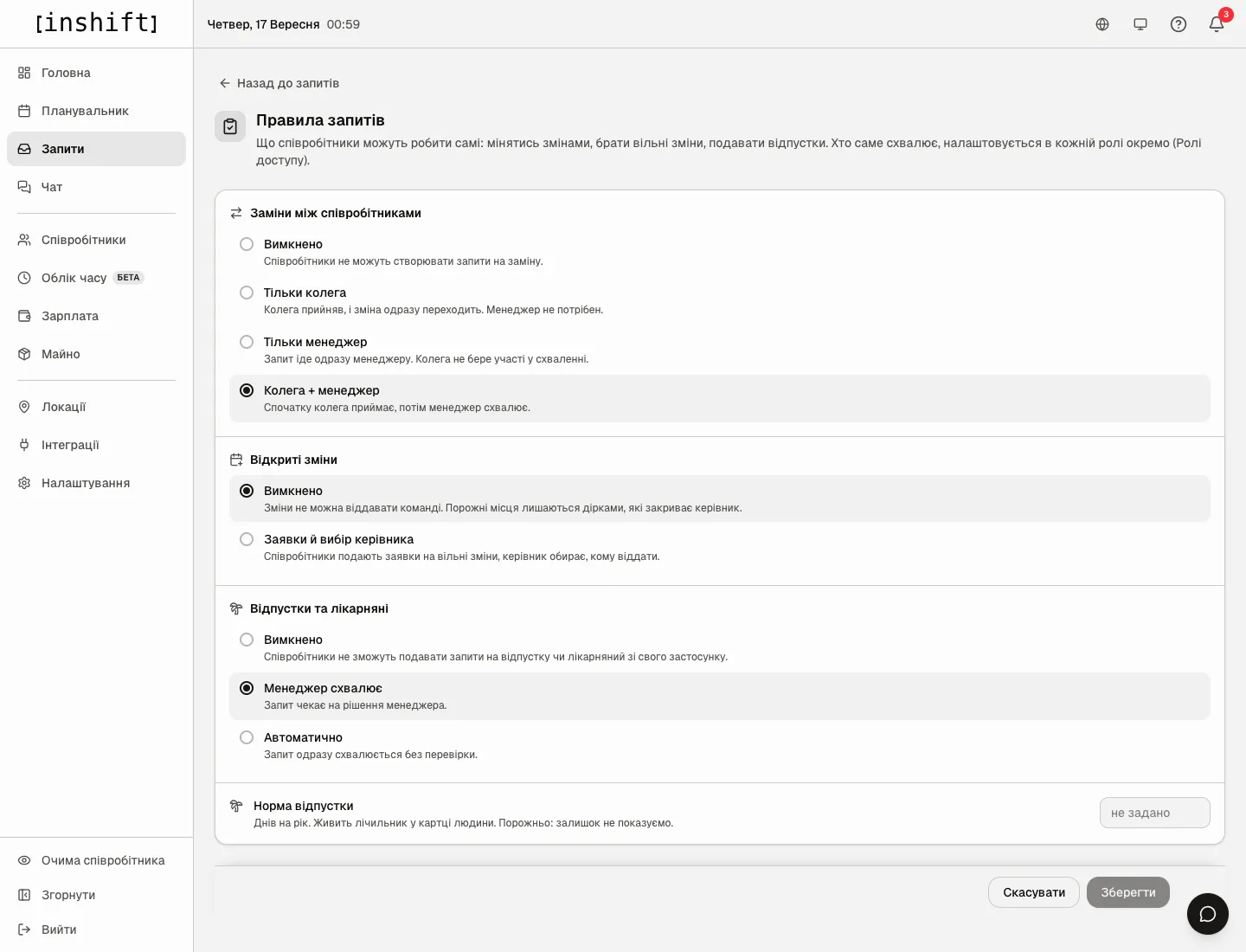
What is on the page
“Shift swaps between employees”: whether a person can give their shift to a colleague and who approves it.
“Off”: employees cannot create swap requests. The “Substitute” button disappears from the app.
“Coworker only”: the colleague accepts, and the shift moves at once. No manager needed.
“Manager only”: the request goes straight to the manager. The colleague takes no part in the approval.
“Coworker + manager”: first the colleague accepts, then the manager approves. This is how a new organisation is set up.
“Open shifts”: whether empty slots can be offered to the team.
“Off”: shifts cannot be offered to the team; empty slots stay gaps for the manager to fill. This is the default in a new organisation.
“Requests, manager picks”: employees apply for open shifts, and the manager chooses who gets one. There is deliberately no “first come, first served” mode.
“Time off & sick leave”: whether a person can request holiday, sick leave, a personal day or an unpaid day.
“Off”: employees cannot submit such requests from their app.
“Manager approves”: the request waits for the manager's decision. This is the default in a new organisation.
“Automatic”: the request is approved at once without review. The manager sees it in the list already approved.
“Vacation quota”: days per year for the whole team. It feeds the balance counter in a person's card and in their app. Empty means the balance is shown nowhere. A separate quota for one person is set in their card, the “Vacation days per year” field.
Step by step
- In the menu on the left click “Requests”, then “Settings” at the top right.
- In each block click the option you need. The “Unsaved changes” row appears at the bottom with the “Cancel” and “Save” buttons. There is deliberately no autosave here: an accidental click will not switch the team's requests off.
- Click “Save”. “Saved” appears. The rule applies at once: in the team's apps the buttons appear or disappear on the next opening, and in “Requests” the matching tabs appear or disappear.
If you leave the page without saving, the panel asks “Leave without saving?”.
What the rules change
The “Requests” section has three tabs: “Time off”, “Swaps”, “Open shifts”. A tab exists only when its kind of request is enabled and your role has the right to approve it. If everything is off, instead of the tabs it says “All request types are disabled. The owner or a co-owner can enable them in the section settings.”.
Above the list on each tab a grey row repeats the mode, for example “3 requests · First a coworker accepts, then the manager approves.”, so you do not have to go to the settings to recall how approval works right now.
Requests already submitted are not deleted when their kind is switched off, but they are shown neither to you nor to the people while the kind is off. Turn it on again, and they return to the list.
Why an action is unavailable
There is no “Settings” button in “Requests”: you are neither the owner nor a co-owner. Ask the owner or a co-owner to change the rules.
There is no “Swaps” or “Time off” tab: this kind of request is off, or your role does not have the “Approve substitutions” or “Approve time-off” right.
The employee's app has no “Substitute” or “Day off” button: the matching kind is off in the rules.
You chose “Automatic”, but the old time off requests are still waiting for a decision: the mode applies to new requests; those already submitted are waiting for you.
Questions and answers
Can different locations have different rules?
No, the rules are one per organisation. Only the people who approve can differ: that is set by the roles' rights and the managers' locations.
Who receives a request when “Manager approves” is chosen?
Those whose role has the “Approve time-off” right, as well as the owner and co-owners. Swaps work the same way with the “Approve substitutions” right, but notifications go only to the managers of the location where the shift is.
What is safest to start with?
What a new organisation comes with: swaps “Coworker + manager”, time off “Manager approves”, open shifts off. That way no shift moves without your knowledge.
Does the team see these settings?
No, only their effects: which buttons are in the app and whether approval is needed.