A payment is a record of money the person received: an advance, a settlement or something else. The panel counts what is owed as earned minus paid since the day payroll started, so every handout is recorded here, otherwise the balance keeps growing. You can pay one person from their row or everyone at once with the “Close period” button.
A settlement sets the “Settled through” line: a statement that for the days up to this date you are square. The line freezes nothing, but after it an edit of past shifts is marked as rewriting money already paid out.
Payments can be recorded and the period closed by the owner, co-owners and anyone whose role has “Pay out wages”, and only for the people they manage: people of their own locations whose role has fewer rights. Nobody records a payment to themselves except the owner. A person’s bank details are seen only by whoever pays the salary, and by the person themselves.
Where to find it
“Payroll” → “Accruals” → the “Payment” icon in the person’s row or the arrow to the left of the name: the row expands, with the payment form on the left. The “Close period” button is at the top next to the period.
The “Payments” tab: the log of all handouts for the period and the list of closings. It is seen by those who can see payroll, from the moment the organisation has money.
The “History” tab: everything done with payroll: payments, rates, terms, premiums, backdated shifts. It is seen by the owner, co-owners and anyone whose role has “View payroll” at “Entire network”.
Step by step: record a payment to one person
- Expand the person’s row under “Accruals”. In the form choose the kind: “Advance”, “Settlement” or “Other”.
- Check the “Amount”: the panel suggests their balance, because that is what is paid out most often. Type a different one if you are paying a part.
- Check the “Payment date”, today by default, and if needed the “Note (optional)”, for example “Cash from the till”.
- If “Settlement” is chosen, the note under the form says “This payment closes the days through 17 September”: the settlement line goes to the end of the shown period, no later than today. “Advance” and “Other” do not set the line.
- Click “Record payment”. The panel says “Payment recorded” or, for a settlement, “Saved, settled through 17 September”. The balance in the row decreases, and the payment appears under “Recent payments” with a pencil for editing and a bin.
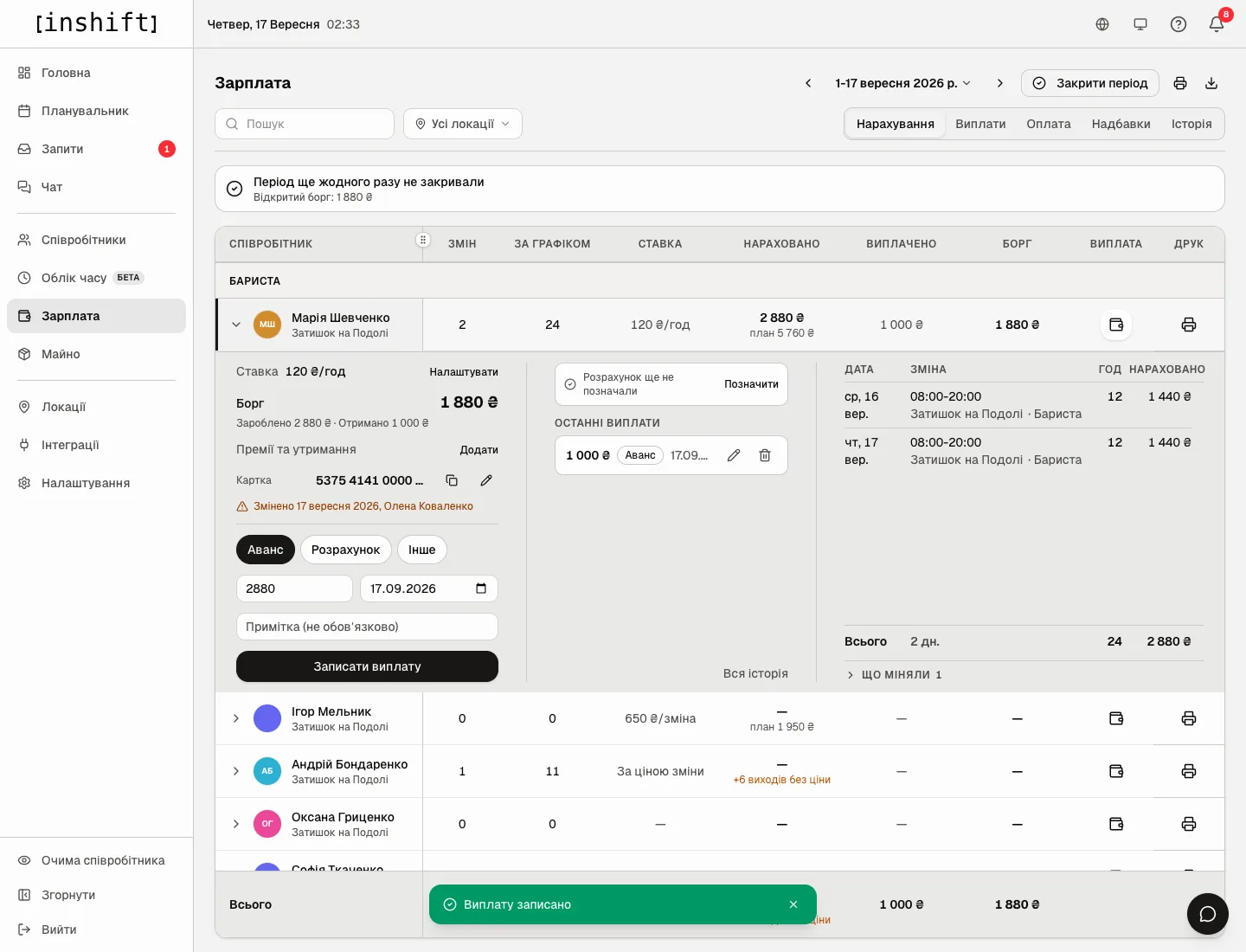
The expanded row after a payment: “Owed 1,880 £”, a card with the “Changed” mark, “Recent payments” with an advance of 1,000 £, the message “Payment recorded”
The settlement line can also be set without a payment: “Settled through” → “Mark” → a date → “Save”. Remove it: the icon next to the date, “Remove settlement mark”.
Step by step: close the period for everyone
- Choose the period at the top, for example “Whole month” of last month, and click “Close period”. A sheet opens for everyone you are allowed to pay.
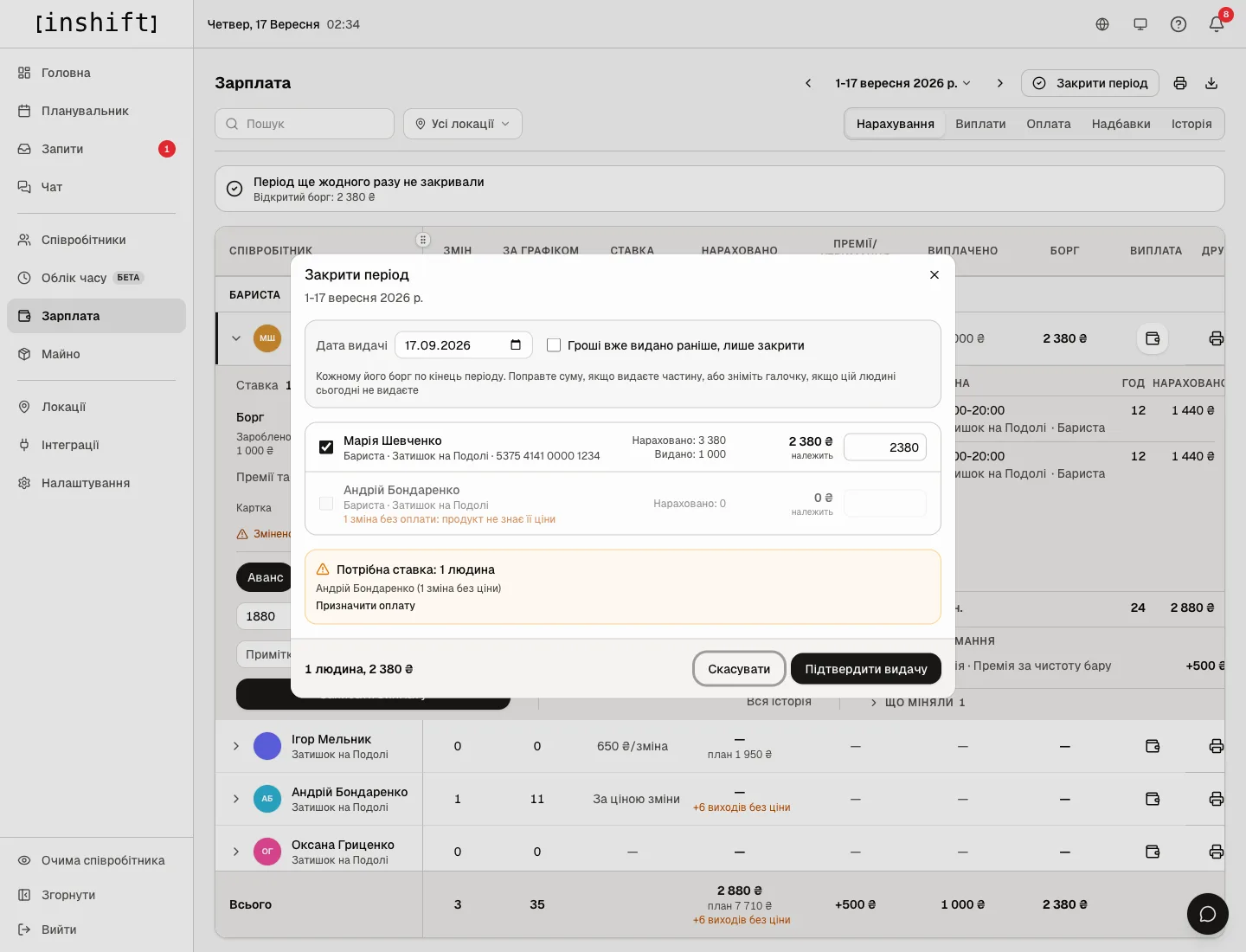
The “Close period” window: “Payment date”, “Money was already paid out earlier, just close”, people’s rows with the “owed” amount, the warning “Pay rate needed: 1 person” - Check the “Payment date”. Each row has the name, position, location, bank details, “Accrued” and “Paid” for the period, the “owed” amount and a field with it. The hint: “Each person gets what they are owed through the end of the period. Edit the amount to pay a part, or untick the person if you are not paying them today”.
- Adjust the amounts or untick people. If you are paying someone a part, the bottom says “1 paid partially, no settlement line is set”: a person you have not fully squared up with does not get the line.
- If the money for this period was paid out earlier without records, for example from a notebook, tick “Money was already paid out earlier, just close”. The hint: “The amounts were calculated by the product. If you paid differently, edit the row. These amounts do not count as cash paid that day, but they do settle the debt”. The button becomes “Close without payout”.
- At the bottom is the total “2 people, 4,380 £”. Click “Confirm payout”. The panel says “Closed: 2 people, 4,380 £”, everyone gets a payment and a settlement line, and the “Payments” tab gets an entry under “Period closings”.
If someone managed to record a payment in another tab while the sheet was open, the server refuses instead of paying twice: open “Close period” again.
Warnings in the closing sheet
“Pay rate needed: 1 person” with a name and “1 with no price”: the person has shifts whose price the product does not know. The row is grey and cannot be ticked. The “Set pay” button leads to the “Pay” tab. Assign pay or a price and open the sheet again.
“1 unpaid person is not counted”: a person on the “Unpaid” method is not included in the sheet.
“Nobody is owed anything: everything has been paid”: there is no balance, nothing to close.
“First set the day payroll starts from”: the start day has not been named, see Accruals: reading the payroll statement.
“changed on already closed days: 500 £”: after the previous closing, shifts or rates for those days were edited, and the amount for them is different. It is included in “owed”.
The “Payments” tab
The log for the period: “Payments: 3” and the amount, then rows by day with the name, kind of payment, position, note, amount and who recorded it. “Closed without payout: 4,380 £, not in the total” marks a closing without money.
Above the log is “Period closings”: when, for which period and through which date, “payout” or “no payout”, how many people and for what amount, who closed it. A cancelled closing stays crossed out with the caption “cancelled”.
Click a person in the log, and it narrows to them for all time: “Maria Shevchenko: full payment history”. Back: “Whole journal”.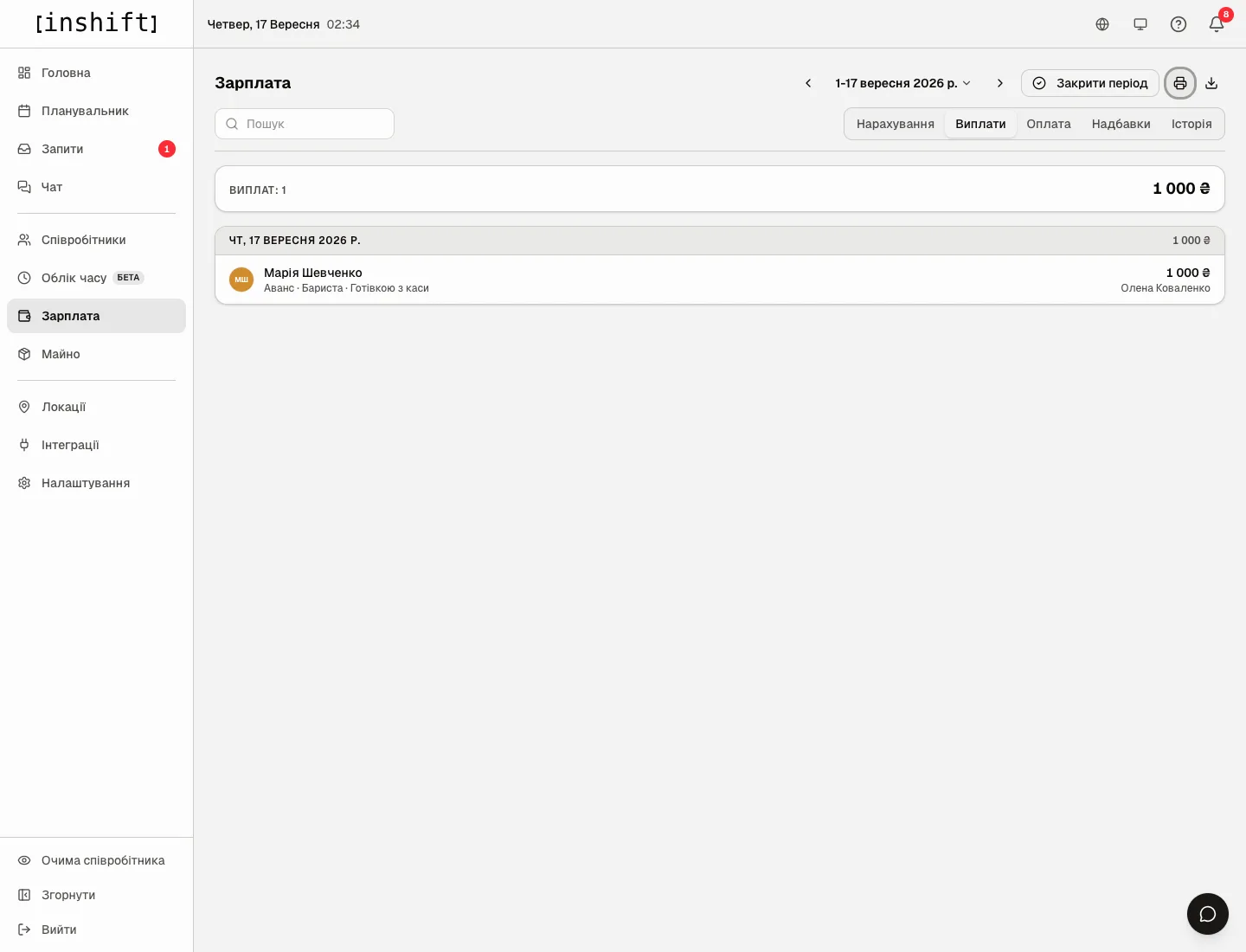
A closing can be cancelled by the owner, co-owners and anyone whose role has “Change pay” at “Entire network”: “Cancel closing” in the closing’s row, with the confirmation “Cancel this closing? Its payments and settlement lines will be removed and the debt will come back.”
Bank details
In the person’s expanded row is the line “No payout details yet” with a pencil. The “Where we pay” window with the hint “Visible only to whoever pays the salary, and to the person themselves”: the “Card” field with the hint “Card number” and “Account” with “IBAN or account number”. After “Save” the panel shows “Payout details saved”, and if the number fails the check: “Saved. The number looks like a typo, please check it”.
The row then shows the number, the “Copy the number” button and the note “Changed 17 September 2026, Jane Smith”: who changed the details and when. The person can add their details themselves in the app, see My pay and bank details.
The details in the row are seen only by someone whose role has “Pay out wages” at this person’s location, and only for the people they manage. Everyone else sees “Bank details are visible only to whoever records payments” instead.
On the “Pay” tab the “No payout details N” tag shows who does not have them yet. On the payment sheet the details are printed next to the amount.
Why an action is unavailable
There is no payment form in the row: your role does not have “Pay out wages” at this person’s location, or the payroll start day has not been named yet.
There is no “Payment” in your own row: nobody pays themselves except the owner. Ask a manager above you or the owner.
A person’s row has no amounts and no “Payment”: the person’s role is equal to or above yours, their pay is handled by a co-owner or the owner.
The expanded row says “Bank details are visible only to whoever records payments” instead of the details: your role does not have “Pay out wages” at this person’s location, it is your own row, or the person’s role is equal to or above yours.
There is no “Close period” button: the same, or the organisation has no rate at all yet.
There is no “Cancel closing”: only the owner, co-owners and anyone whose role has “Change pay” at “Entire network” cancel.
“Cancel closing” is grey with the caption “This period was closed by a manager above you. Only they or the owner can reopen it”: a junior manager does not cancel a senior one’s closing.
There is no “History” tab: only the owner, co-owners and anyone whose role has “View payroll” at “Entire network” see it.
There is no “Payments” tab: the organisation is not counting money yet, assign pay.
I cannot tick a person in the closing sheet: they have shifts with no price, see the warnings above.
Questions and answers
How does “Advance” differ from “Settlement”?
Not in the balance: both reduce what is owed. “Settlement” additionally sets the “Settled through” line at the end of the period, “Advance” does not.
What if I recorded the wrong amount?
Under “Recent payments” the pencil opens the payment for editing, the bin removes it. A removed payment stays on the “History” tab as the entry “Payment removed”.
How do I start keeping money from mid-year if it was paid from a notebook before?
The “From which day we count payroll” bar already has the first day of the current month, but any day can be entered: a Monday or the day the location opened. The product does not count earlier days. If the start is set earlier, close the past periods with “Money was already paid out earlier, just close”.
Does the person see their payments in the app?
No, the app shows only the accrued amount and its parts. Payments and the balance are visible only in the panel.
Can I pay in advance?
Yes, record an “Advance” for the amount you need. The balance goes negative and shows as “Overpaid” until the person works it off.