Modules are the parts of the product not everyone needs: “Time tracking”, “Equipment tracking” and “Training”. A new organisation starts without them, so the panel and the app are not cluttered with what is not used. The owner or a co-owner turns a module on with one switch, and the section appears in the panel menu and in the team’s app. Turning it off erases nothing: what was recorded stays in the database, and it can be turned back on at any time.
Only the organisation owner and co-owners can turn modules on and off.
Where to find it
“Settings” → the “Modules” tab → “Optional modules” with the caption “Turn on what you actually need. A module that is off appears nowhere and calculates nothing”.
While a module is off, the owner and co-owners still see its section in the menu, “Time tracking” or “Property”, with a placeholder explaining the module and the “Turn the module on” button. The rest of the team does not see a section that is off at all.
Which modules there are
“Time tracking”: “Clock-in and clock-out marks, a live board and a PIN for anyone without a phone. Turning it off does not erase past marks”. Once it is on, “Time tracking” appears in the menu, and the team’s app gets the “Check in” button on “Home”. See Enable time tracking and set up a terminal.
“Equipment tracking”: “Uniforms, keys, tools, devices: what has been handed out and who holds it now. Turning it off does not erase items or handovers”. Once it is on, “Property” appears in the menu, and the app gets “My property” in the profile. See Asset register: adding items, catalog and item card.
“Training”: “Trainees and mentors: a “Trainee” mark on the profile, trainee pay and extra pay for mentors. Switching off keeps the marks and the money earned in training”. Once it is on, “Training” appears in the menu, the module card gets a “Configure” link, and the app gets a “Training” item under “More” for trainees, mentors and managers with the “Training” right. The module can be turned off only when nobody on the team is in training. See Training: trainees and mentors.
Open shifts, swaps and time off are not modules but request rules: they are turned on under “Requests” → “Settings”, see Request rules: what to allow the team.
Step by step: turn on
- Open “Settings” → “Modules” or the module’s section in the menu with the placeholder.
- Turn on the switch in the module’s card or click “Turn the module on” on the placeholder. Under the button is a reminder: “You can turn it off at any time, nothing recorded is erased”.
- The section appears in the menu for you and for anyone whose role has the permission for it: “Manage time tracking” or “Manage property”. In the team’s app the corresponding screens appear at the next refresh.
Step by step: turn off
- In the module’s card turn off the switch. The panel asks “Turn off “Time tracking”?” and lists the consequences, having counted them in advance.
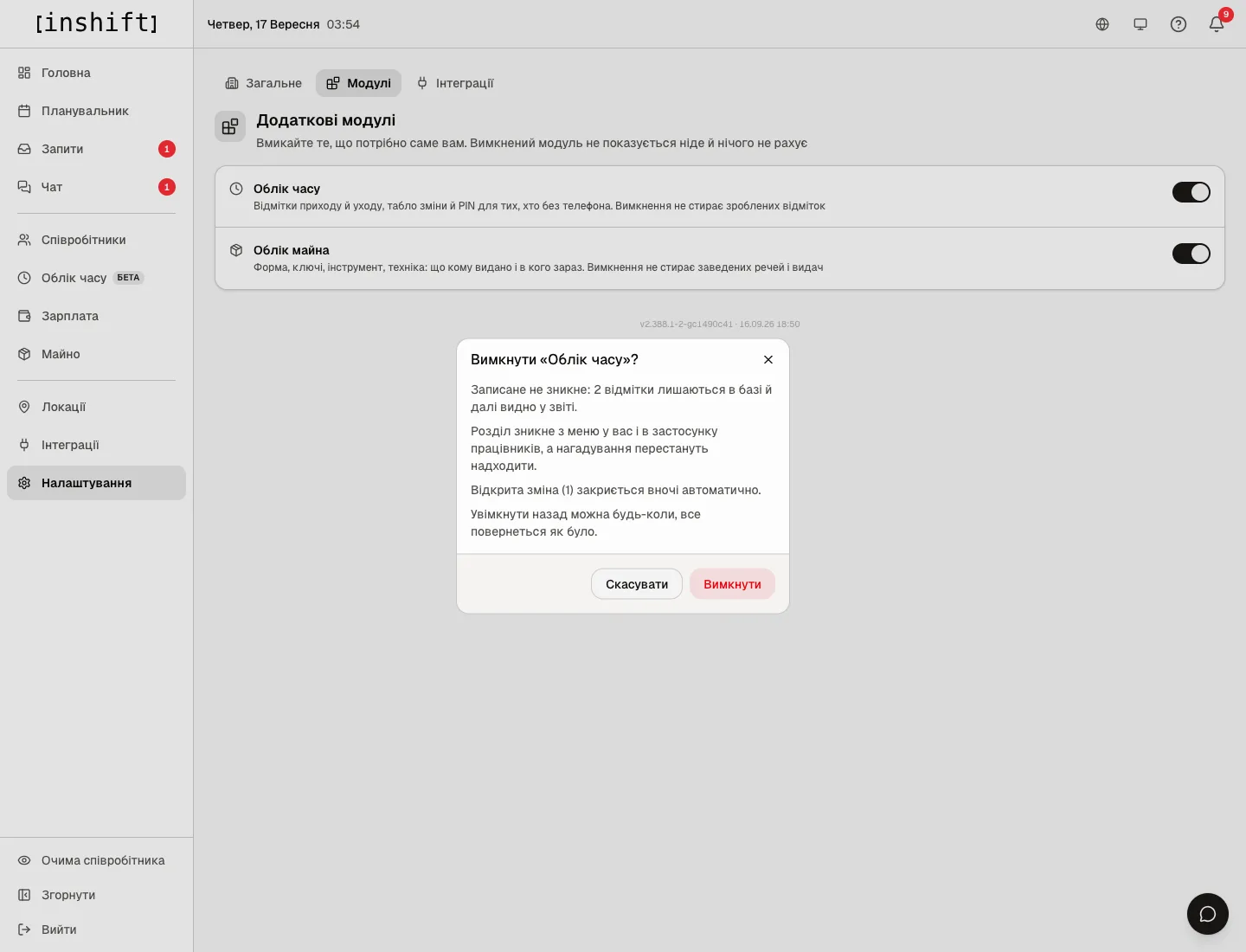
The “Turn off “Time tracking”?” window: what stays in the database, what disappears from the menu, what closes overnight, the “Cancel” and “Turn off” buttons - Read: “Nothing recorded is erased: 2 marks stay in the database and in the report.” or for property “Nothing recorded is erased: 3 items worth 12,000 £ are held by employees, handovers and history stay in the database.” Then “The section disappears from your menu and from the employee app, and reminders stop.”, for time tracking also “One open shift will be closed automatically overnight.”, and “You can turn it back on at any time and everything returns as it was.”
- Click “Turn off”. The section disappears from the team’s menu, and you keep the placeholder with the “Turn the module on” button.
Why an action is unavailable
There is no “Modules” tab: you are neither the owner nor a co-owner of the organisation. The module’s section says “The module is off. The owner or a co-owner can turn it on”.
You turned a module on, but a location manager does not see it: their role does not have the “Manage time tracking” or “Manage property” permission, see Roles and access.
You turned a module on, but a person’s app has no such screen: the app refreshes the organisation settings at the next opening, have them close and open it.
You turned a module off, but items are still assigned to people in their cards: that is by design, what was recorded is not erased. Take the items back after turning the module on.
Questions and answers
What happens to the marks if time tracking is turned off for a month?
Nothing. The old marks stay in the database and in the “Checked in” column of the statement, there will be no new ones. After turning it on everything continues.
Can a module be turned on for just one location?
No, a module is turned on for the whole organisation. Who sees it is defined by the permissions in roles.
Where are open shifts?
In the request rules: “Requests” → “Settings” → “Open shifts”. This is a setting, not a module.