An employee in the app sees their own: their schedule, their pay, their requests, their items, and of other people’s only what their role has opened to them: colleagues of their location in the schedule and the team, chat, announcements. What exactly is open is set by the role in the person’s card: “Employee” sees exactly their own schedule and the team of their location, “Manager” and “Director” more. Bank details, colleagues’ pay, schedule drafts and empty slots in the schedule a person never sees.
The simplest way to check what a particular person sees: “Employee’s view” in the panel, see Preview as an employee.
Where to find it
A person’s permissions: “Employees” → the card → “Access rights”, “Details” next to the role expands the exact list. The levels: “None”, “Own”, “My locations”, “Entire network”, see Roles and access.
See for yourself: “Employee’s view” → the person’s phone.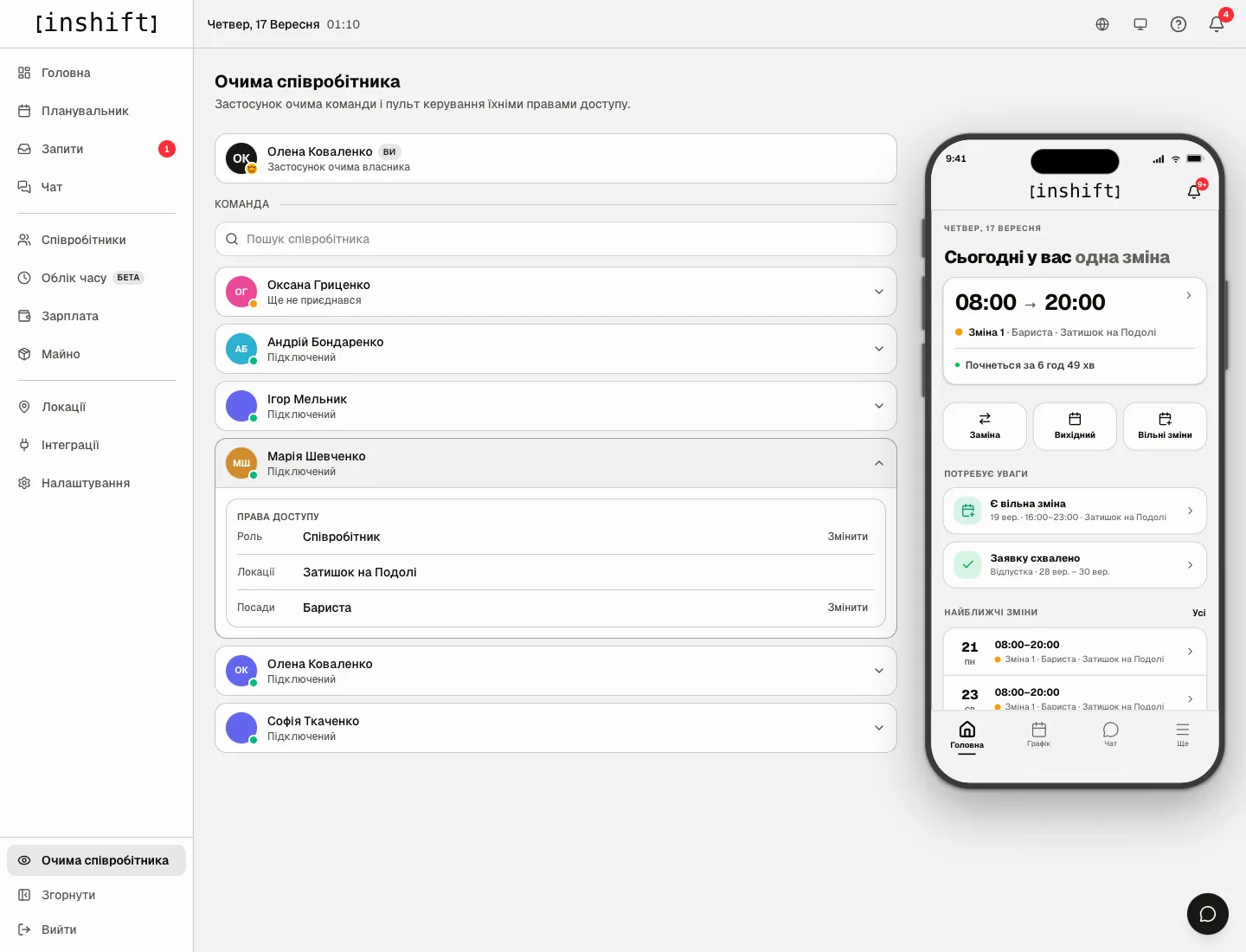
The schedule
Sees: their own published shifts at all locations, including cover at other locations. Colleagues of their own location on the same day, if “View rota” is set to “My locations”; with “Entire network” all locations. The time, shift type, location, position.
Does not see: drafts, “Someone needed” empty slots, shifts of other locations with “Own”, shift prices. An empty day in the app looks no different from a day the manager has not built yet.
Receives notifications only about their own published shifts, see Notifications are not arriving.
Money
Sees: “Accrued” for the period and what it is made of, their rate, bonuses and deductions, if “View payroll” is not “None”, see My pay and bank details.
Does not see: payouts, the balance, colleagues’ rates and amounts, shift prices, other people’s bank details. Their own bank details they see and can change.
A manager with “View payroll: My locations” sees the amounts of the people of their locations whose role has fewer rights than theirs. They pay out money only with “Pay out wages” and change rates only with “Change pay”. Nobody pays out or changes their own pay except the owner.
The team and colleagues
Sees: the team list within “View team”, colleagues’ cards with position, location, length of service and the “Contacts & personal” block with what the colleague filled in, see Team and birthdays in the app. The day’s birthdays, if the manager turned the display on.
Does not see: colleagues’ pay, holidays, items and reason for dismissal, dismissed people.
Requests and swaps
Sees: their own time-off and sick-leave requests with statuses, their own swap requests, open shifts they can take, incoming requests from colleagues.
A trainee (the “Trainee” mark on the card) makes no requests and does not swap shifts, see Training in the app.
Does not see: other people’s requests and the decisions on them. A manager with the “Approve time-off” or “Approve substitutions” permissions sees “Pending approval” for their locations, see Approve requests from your phone.
Chat, items, time tracking
Chat: the general chat, their location’s chat, groups they were added to, announcements, personal conversations. Colleagues’ personal conversations and groups without them are seen by nobody, the manager included.
Items: only their own items and handover records. The organisation’s item list they do not see.
Time tracking: their own marks under “My check-ins”. The board and other people’s marks are seen only by whoever has “Manage time tracking”.
Profile: their name, position, permissions, location, length of service, holiday, and they can change the phone, date of birth, gender and photo. The sign-in email and password are changed in “Settings” → “Account” with a code sent to their email, see Profile, language, security.
Why an action is unavailable
A person does not see colleagues in the schedule: “View rota” in their role is set to “Own”. Raise it to “My locations”.
A person sees pay, and you do not want that: create a role with “View payroll: None” and assign it.
A person does not see a shift you put in: the shift is a draft, see I cannot see my schedule.
A person does not see the “Check in”, “Open shifts”, “My property” buttons: the corresponding module or rule is turned off.
A location manager sees someone else’s location: in their card that location is under “Also works at other locations” or “All” is chosen.
Questions and answers
Can a person be shown only their schedule and nothing else?
Yes: a role with “View rota: Own”, “View team: None”, “View payroll: None”, “View stats: None”. Their own schedule cannot be taken away.
Does a person see who changed their shift and when?
No, only the shift itself and the notification “Shift moved” or “Shift time changed”. In the panel the author is visible only for edits of past days, under “Payroll” → “History”; who changed a future shift is not stored.
Do colleagues see that a person is on holiday?
No. They only see that the person has no shifts. The holiday is visible to the manager.